라벨이 검색어인 게시물 표시

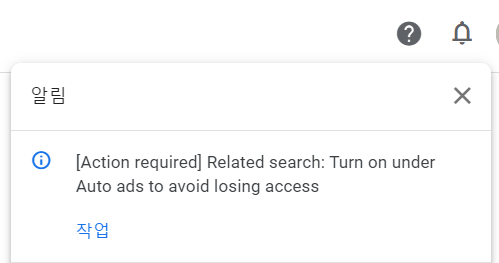
[조치 필요] 관련 검색어: 액세스 권한을 잃지 않으려면 자동 광고에서 켜세요.
이미지
[Alerts] [Action required] Related search: Turn on under Auto ads to avoid losing access [Action required] Related search: Turn on under Auto ads to avoid losing access Related search lab will soon close. To continue experiencing the benefits of Related search switch it on under Auto ads We're excited to announce that the Related search lab is now a permanent part of Auto ads. That means the Related search lab will soon close. To continue experiencing the benefits of Related search, follow these steps: Sign in to your AdSense account. Click Ads. In the table of all your sites, click Edit next to your site. Your site opens in the ad settings preview. Under "Ad settings", make sure Auto ads is turned on. Click In-page formats, and turn on Related search. Confirm you agree to the Terms of Service and policies. Click Apply to site. What does this mean for you? We're making this ...
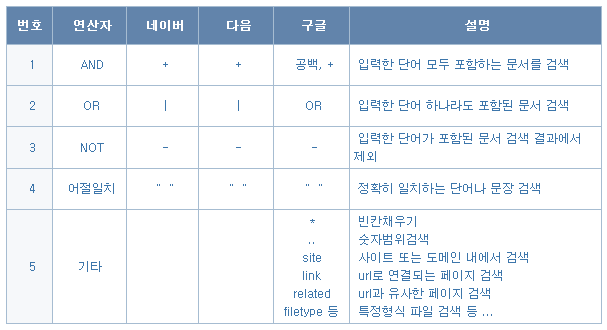
[Tip]키워드 검색 방법(단어/문장/연산자)

이미지
keycolor [Tip]키워드 검색 방법 다중검색 기호 키워드 검색 방법 (네이버, 다음, 구글) : 네이버 블로그   함께 검색한 항목 네이버 검색 연산자 네이버 고객센터 결과내 검색 네이버 검색어 or 특정 단어 만 검색 구글 연산자 더 정확한 웹 검색결과 얻기 - Google 검색 고객센터 Google에서 고급검색 실행하기 구글링 기간 설정   상세검색에 대한 안내 및 사용방법 상세검색은 사용자가 원하는 검색 조건을 스스로 설정하여,  찾고자 하는 정보를 더 빠르고 쉽게 찾을 수 있도록 하는 기능입니다.    대부분의 경우에는 기본검색(그린윈도우 검색창)으로 충분하지만,  검색결과를 좁히거나 조정하고 싶으실 때 상세검색을 이용해 보세요.   블로그, 카페, 지식iN, 뉴스, 웹문서, 사이트, 이미지, 동영상, 전문정보, 책본문,  뉴스라이브러리 등의 검색결과에 적용되며 어학사전, 지식백과, 음악, 실시간검색 등  일부 검색결과에서는 상세검색 조건이 적용된 검색결과를 제공하지 않습니다.   1. 상세검색 사용법 네이버 검색결과에서 검색옵션의 ‘상세검색’ 을 클릭하면  상세검색 창이 열리며 상세검색 창은 다음과 같이 구성되어 있습니다.      1) 기본검색   기본 검색어를 입력하는 창입니다.   입력한 검색어 중 하나라도 포함된 검색결과를 얻고 싶으실 때에는    기본검색 창 하단의 체크박스(OR 방식으로 검색)를 체크해 주세요.    2) 상...

이 블로그의 인기 게시물

[WIN]SMB1 프로토콜이 필요합니다.시스템에 SMB2 이상이 필요합니다.(윈도우10 네트워크 연결오류)

[Tip] 카카오톡(Kakaotalk)대화내용 CSV 파일로 저장하기(구글 스크립트 시트 정리하기)

[Tip] Android 스마트폰 PC(Windows)에서 마이크 대용으로 사용하기(WO Mic Free)